
webpack
laoqin
webpack编译代码解析
配置
# webpack
# 概念
webpack 是一个现代 JavaScript 应用程序的静态模块打包器,它包含以下几个方面
- entry (入口): 指示 webpack 应该使用哪个模块,来作为构建其内部依赖图的开始
- output (出口): 控制 webpack 如何输出项目
- module (解析模块): 用于对模块的源代码进行转换(图片, es6, ts)
- plugins(插件): 用于扩展 webpack 的功能
- mode(模式): 告知 webpack 使用相应模式的内置优化
# 先编译源代码
src 目录
--| src--| index.js--| title.js
- index.js
const title = require('./title')
console.log(title)
console.log('index.js')
1
2
3
2
3
- title.js
module.exports = {
  name: 'title'
}
console.log('title.js')
1
2
3
4
2
3
4
编译 webpack 代码
npx webpack
1
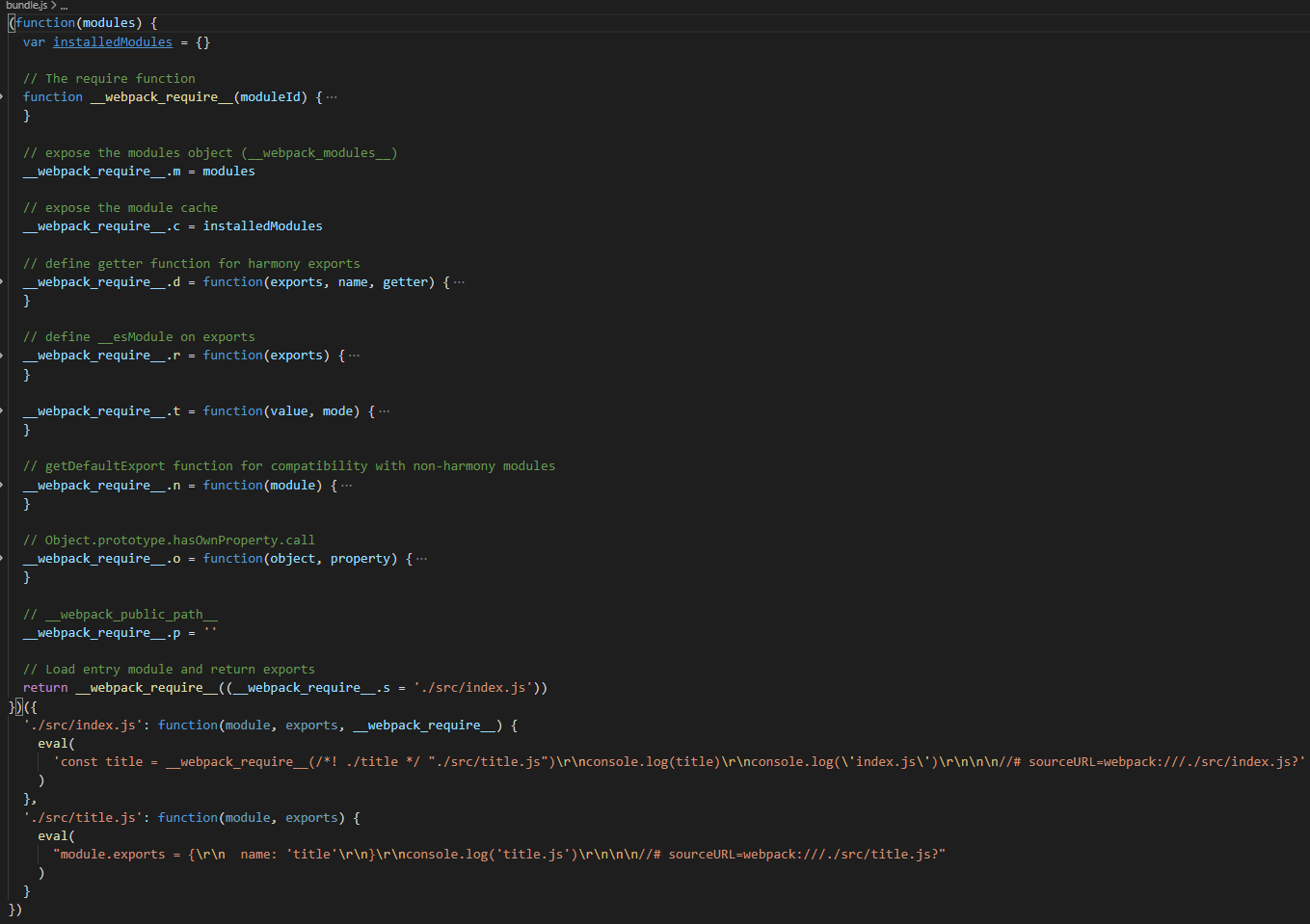
编译后的 bundle.js
# webpack 编译代码解析
bundle.js 代码解析
- 有一个 IIFE(自执行)函数,接收一个形参
modules形成一个闭包
- 有一个 IIFE(自执行)函数,接收一个形参
;(function(modules) {})
1
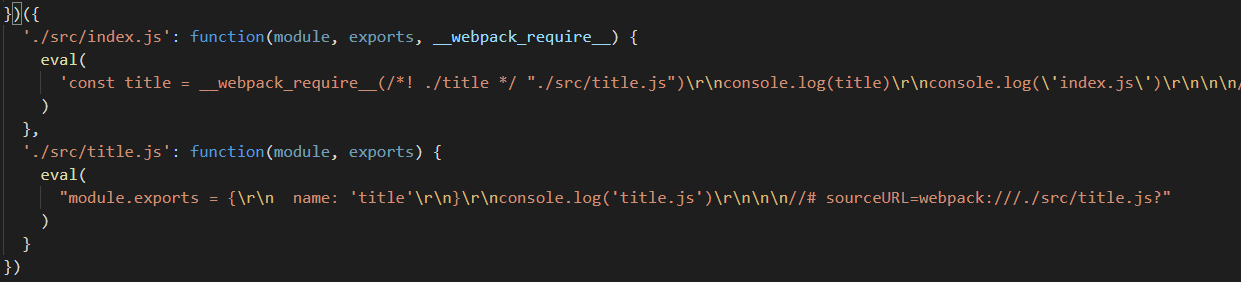
- 给 IIFE 函数传参, 传入一个参数对象
对象的 key 是 文件目录,作为文件 id
对象的值是: 一个函数
- 内部实现了一套
commonjs规范, 也就是__webpack_require__函数
- 内部实现了一套
- 给
__webpack_require__添加一些静态方法或属性,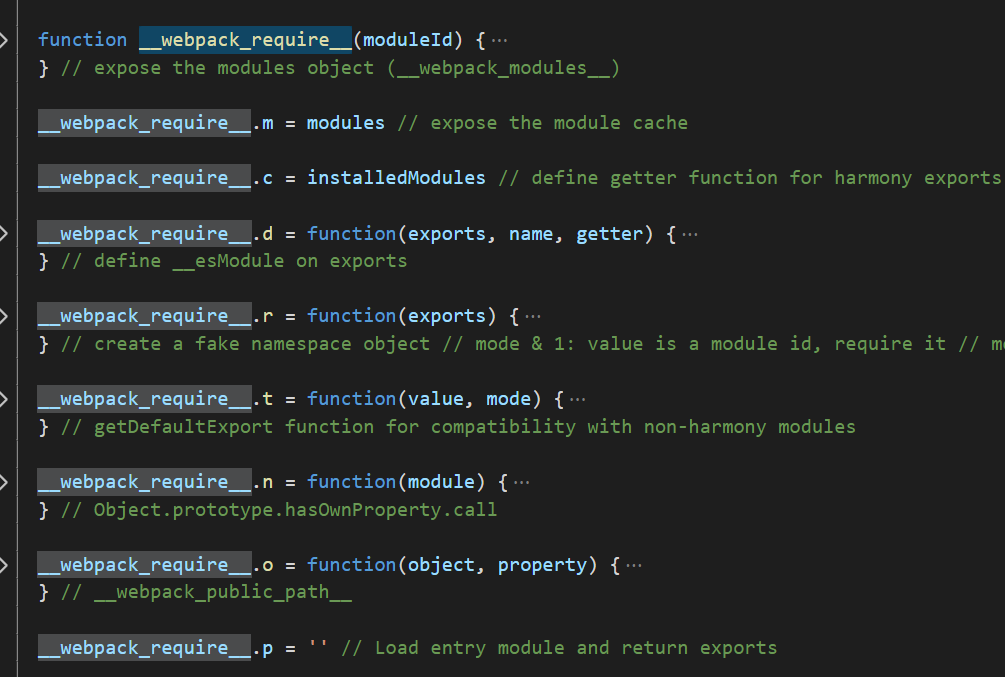
- 给
# 1. webpack_require 方法
;(function(modules) {
  // 创建缓存对象
  var installedModules = {}

  //创建 __webpack_require__ 函数, 接收参数 moduleId,也就是 对象的key
  function __webpack_require__(moduleId) {
    // 判断缓存里有木有这个文件
    if (installedModules[moduleId]) {
      return installedModules[moduleId].exports
    }
    // 否则的话,就把这个文件存到缓存里
    var module = (installedModules[moduleId] = {
      i: moduleId, // 模块的id
      l: false, // 模块是否加载过
      exports: {} // 导出的对象
    })
    //   对象的value 值是个函数, 执行这个函数同时绑定 this 上下文指向
    modules[moduleId].call(
      module.exports,
      module,
      module.exports,
      __webpack_require__
    )
    //  存过之后, 将标志置为 true,说明此文件已经加载过了
    module.l = true
    return module.exports
  }
  // 将执行结果返回
  return __webpack_require__('./src/index.js')
})({
  './src/index.js': function(module, exports, __webpack_require__) {
    var title = __webpack_require__(/*! ./title */ './src/title.js')
    console.log(title)
  },
  './src/title.js': function(module, exports) {
    exports.age = 10
    module.exports = {
      name: 'title'
    }
  }
})
1
2
3
4
5
6
7
8
9
10
11
12
13
14
15
16
17
18
19
20
21
22
23
24
25
26
27
28
29
30
31
32
33
34
35
36
37
38
39
40
41
2
3
4
5
6
7
8
9
10
11
12
13
14
15
16
17
18
19
20
21
22
23
24
25
26
27
28
29
30
31
32
33
34
35
36
37
38
39
40
41
# 配置文件
默认: webpack.config.js
webpack 是需要传入一个配置对象,然后导出这个对象
mkdir webpack
cd webpack
npm init -y
yarn add -D webpack webpack-cli
1
2
3
4
2
3
4
创建源码
mkdir src
cd src
touch index.js
1
2
3
2
3
index.js
console.log(10)
1
打包
npx webpack
1
此时打包会报警告
 意思是缺少环境模式,需要你配置
 mode 属性
# 配置打包指令
package.json
"scripts": {
    "build": "webpack"
}
1
2
3
2
3
yarn build
1
# mode(模式)
- 配置打包的模式, 类型
string, 值可以是development,production,none
module.exports = {
  mode: 'development'
}
1
2
3
2
3
# entry(项目入口)
- 单入口:配置一个字符串
module.exports = {
  entry: './src/index.js'
}
1
2
3
2
3
- 多入口:配置一个对象
module.exports = {
  entry: {
    main: './src/index.js',
    app: './src/app.js'
  }
}
1
2
3
4
5
6
2
3
4
5
6
# ouput(项目出口)
即使可以存在多个入口起点,但只指定一个输出配置。
用法:
- filename: 用于输出文件的文件名。
- path: 打包输出到哪个目录
# 单入口配置
const path = require('path')
module.exports = {
  output: {
    filename: 'bundle.js',
    path: path.resolve(__dirname, 'dist')
  }
}
1
2
3
4
5
6
7
2
3
4
5
6
7
# 多入口配置
const path = require('path')
module.exports = {
  mode: 'development',
  entry: {
    main: './src/index.js',
    app: './src/app.js'
  },
  output: {
    filename: '[name].js',
    path: path.resolve(__dirname, 'dist')
  }
}
1
2
3
4
5
6
7
8
9
10
11
12
2
3
4
5
6
7
8
9
10
11
12
# 打包到指定的文件目录
const path = require('path')
module.exports = {
  mode: 'development',
  entry: {
    main: './src/index.js',
    app: './src/app.js'
  },
  output: {
    path: path.resolve(__dirname, 'dist'),
    filename: 'static/js/[name].[chunkhash:8].js'
  }
}
1
2
3
4
5
6
7
8
9
10
11
12
2
3
4
5
6
7
8
9
10
11
12
# loader(转换模块)
# 解析样式(style, css)
- 解析顺序: 从右向左解析
yarn add -D css-loader style-loader
1
语法
- module.rules
module.exports = {
  module: {
    rules: [
      { test: /\.css$/, use: 'css-loader' },
      { test: /\.ts$/, use: 'ts-loader' }
    ]
  }
}
1
2
3
4
5
6
7
8
2
3
4
5
6
7
8
简化语法
module.exports = {
  module: {
    rules: [
      {
        test: /\.css$/,
        use: ['style-loader', 'css-loader']
      }
    ]
  }
}
1
2
3
4
5
6
7
8
9
10
2
3
4
5
6
7
8
9
10
# 单独抽离样式
yarn add -D mini-css-extract-plugin
1
const MiniCssExtractPlugin = require('mini-css-extract-plugin')
module.exports = {
  module: {
    rules: [
      {
        test: /\.css$/,
        use: [
          {
            loader: MiniCssExtractPlugin.loader,
            options: {
              publicPath: '../',
              hmr: process.env.NODE_ENV === 'development'
            }
          },
          'css-loader'
        ]
      }
    ]
  },
  plugins: [
    new MiniCssExtractPlugin({
      filename: '[name].css',
      chunkFilename: '[id].css',
      ignoreOrder: false // Enable to remove warnings about conflicting order
    })
  ]
}
1
2
3
4
5
6
7
8
9
10
11
12
13
14
15
16
17
18
19
20
21
22
23
24
25
26
27
2
3
4
5
6
7
8
9
10
11
12
13
14
15
16
17
18
19
20
21
22
23
24
25
26
27
# 处理 css 自动添加浏览器前缀
yarn add -D postcss-loader autoprefixer
1
根目录下新健 postcss.config.js
module.exports = {
  plugins: [require('autoprefixer')]
}
1
2
3
2
3
webpack.config.js
const MiniCssExtractPlugin = require('mini-css-extract-plugin')
module.exports = {
  module: {
    rules: [
      {
        test: /\.css$/,
        use: [
          {
            loader: MiniCssExtractPlugin.loader,
            options: {
              publicPath: '../',
              hmr: process.env.NODE_ENV === 'development'
            }
          },
          { loader: 'css-loader', options: { importLoaders: 1 } },
          'postcss-loader'
        ]
      }
    ]
  }
}
1
2
3
4
5
6
7
8
9
10
11
12
13
14
15
16
17
18
19
20
21
2
3
4
5
6
7
8
9
10
11
12
13
14
15
16
17
18
19
20
21
# 解析图片
- 需要一个合适的 loader,对图片进行处理
file-loader: 指示 webpack 将所需对象作为文件发出并返回其公共 URL url-loader: 以 base64 编码的 URL 加载文件,减少 http 请求。
yarn add -D file-loader
1
- file-loader
module.exports = {
  module: {
    rules: [
      {
        test: /\.(png|jpg|gif)$/,
        use: [
          {
            loader: 'file-loader',
            options: {}
          }
        ]
      }
    ]
  }
}
1
2
3
4
5
6
7
8
9
10
11
12
13
14
15
2
3
4
5
6
7
8
9
10
11
12
13
14
15
url-loader功能类似于 file-loader,但是在文件大小(单位 byte)低于指定的限制时,可以返回一个 DataURL。
module.exports = {
  module: {
    rules: [
      {
        test: /\.(png|jpg|gif)$/,
        use: [
          {
            loader: 'url-loader',
            options: {
              limit: 8192
            }
          }
        ]
      }
    ]
  }
}
1
2
3
4
5
6
7
8
9
10
11
12
13
14
15
16
17
2
3
4
5
6
7
8
9
10
11
12
13
14
15
16
17
# 处理 es6 等语法
- 使用 babel-loader
yarn add -D babel-loader@8.0.0-beta.0 @babel/core @babel/preset-env
1
module.exports = {
  module: {
    rules: [
      {
        test: /\.js$/,
        exclude: /(node_modules|bower_components)/, //忽略文件, 不去解析里边的语法
        use: {
          loader: 'babel-loader',
          options: {
            presets: ['@babel/preset-env']
          }
        }
      }
    ]
  }
}
1
2
3
4
5
6
7
8
9
10
11
12
13
14
15
16
2
3
4
5
6
7
8
9
10
11
12
13
14
15
16
# plugins(插件)
# 处理 html 文件
yarn add -D html-webpack-plugin
1
const HtmlWebpackPlugin = require('html-webpack-plugin')
module.exports = {
  plugins: [
    new HtmlWebpackPlugin({
      title: 'webpack',
      //创建一个在内存中生成html页面的插件
      template: path.join(__dirname, './src/index.html'), //指定模板页面
      filename: 'app.html', //指定生成页面的名称,index.html浏览器才会默认直接打开
      //   以下配置开启各种html 压缩
      minify: {
        collapseWhitespace: true,
        removeComments: true,
        removeRedundantAttributes: true,
        removeScriptTypeAttributes: true,
        removeStyleLinkTypeAttributes: true,
        useShortDoctype: true
      }
    })
  ]
}
1
2
3
4
5
6
7
8
9
10
11
12
13
14
15
16
17
18
19
20
2
3
4
5
6
7
8
9
10
11
12
13
14
15
16
17
18
19
20
# css 文件单独抽离
- 基本打包
const MiniCssExtractPlugin = require('mini-css-extract-plugin')
module.exports = {
  plugins: [
    // 样式单独抽离
    new MiniCssExtractPlugin({
      filename: '[name].css',
      chunkFilename: '[id].css',
      ignoreOrder: false // Enable to remove warnings about conflicting order
    })
  ]
}
1
2
3
4
5
6
7
8
9
10
11
2
3
4
5
6
7
8
9
10
11
# css 文件抽离到指定目录
- 单独打到到 static 目录
const MiniCssExtractPlugin = require('mini-css-extract-plugin')
module.exports = {
  plugins: [
    // 样式单独抽离
    new MiniCssExtractPlugin({
      // 单独打到 static 目录下
      filename: 'static/css/[name].[contenthash:8].css',
      chunkFilename: 'static/css/[name].[contenthash:8].css',
      ignoreOrder: false // Enable to remove warnings about conflicting order
    })
  ]
}
1
2
3
4
5
6
7
8
9
10
11
12
2
3
4
5
6
7
8
9
10
11
12
# 自动清理 dist 目录
const { CleanWebpackPlugin } = require('clean-webpack-plugin')
module.exports = {
  plugins: [new CleanWebpackPlugin()]
}
1
2
3
4
2
3
4
# 配置打包进度条
const ProgressBarPlugin = require('progress-bar-webpack-plugin')
const chalk = require('chalk')

module.exports = {
  plugins: [
    new ProgressBarPlugin({
      complete: '█',
      format: `${chalk.green('Building')} [ ${chalk.green(
        ':bar'
      )} ] ':msg:' ${chalk.bold('(:percent)')}`,
      clear: true
    })
  ]
}
1
2
3
4
5
6
7
8
9
10
11
12
13
14
2
3
4
5
6
7
8
9
10
11
12
13
14
# 配置 resolve
# 配置路径别名
module.exports = {
  resolve: {
    alias: {
      '@': path.resolve(__dirname, './src/')
    }
  }
}
1
2
3
4
5
6
7
2
3
4
5
6
7
# 外部扩展(externals)
防止将某些 import 的包(package)打包到 bundle 中,而是在运行时(runtime)再去从外部获取这些扩展依赖, 也就是拆包
# 配置动态 cdn
- 1.自动注入到 html 文件中
例如引入 vue element cdn
webpack.config.js
module.exports = {
  plugins: [
    new HtmlWebpackPlugin({
      title: 'webpack',
      //创建一个在内存中生成html页面的插件
      template: path.join(__dirname, './src/index.html'), //指定模板页面
      filename: 'app.html', //指定生成页面的名称,index.html浏览器才会默认
      cdn: {
        css: ['https://cdn.bootcss.com/element-ui/2.8.2/theme-chalk/index.css'],
        js: [
          'https://cdn.bootcss.com/vue/2.6.10/vue.min.js',
          'https://cdn.bootcss.com/element-ui/2.8.2/index.js'
        ]
      }
    })
  ]
}
1
2
3
4
5
6
7
8
9
10
11
12
13
14
15
16
17
2
3
4
5
6
7
8
9
10
11
12
13
14
15
16
17
index.html
<!DOCTYPE html>
<html lang="en">
  <head>
    <meta charset="UTF-8" />
    <title><%= htmlWebpackPlugin.options.title %></title>
    <!-- import cdn css -->
    <% if(htmlWebpackPlugin.options.cdn) {%>
        <% for(var css of htmlWebpackPlugin.options.cdn.css) { %>
            <link rel="stylesheet" href="<%=css%>" />
        <% } %>
     <% } %>
  </head>
  <body>
    <div id="box"></div>
    <!-- import cdn js -->
    <% if(htmlWebpackPlugin.options.cdn) {%>
        <% for(var js of htmlWebpackPlugin.options.cdn.js) { %>
            <script src="<%=js%>"></script>
        <% } %>
    <% } %>
  </body>
</html>
1
2
3
4
5
6
7
8
9
10
11
12
13
14
15
16
17
18
19
20
21
22
2
3
4
5
6
7
8
9
10
11
12
13
14
15
16
17
18
19
20
21
22
# 配置分包
# 处理浏览器文件缓存
使用 hash 签名